

Use This Penny Stock Portfolio Tracker to Accurately Track Your Portfolio
A key component of being a successful investor is keeping track of your results. However, finding or creating a penny stock portfolio tracker is challenging. While a brokerage account provides you with portfolio value and trade logs, it does not provide all of the information in one place.
Reasons to Adopt a Penny Stock Portfolio Tracker
Tracking results is a key part of any investment plan for the following reasons:
- Helps you clearly define entry and exit points
- Shows you previous holdings
- Allows you to see how your portfolio is performing
Rule #6 of the Bowser Game Plan details the need to accurately track your portfolio, but you might be lost on how to do so. Now, there is a free option to simplify tracking your portfolio with The Bowser Report's Penny Stock Portfolio Tracker.
Getting Started
To take full advantage of the Penny Stock Portfolio Tracker, including automatically-updated stock prices, you’ll need a Google account. If you do not have a Google account but wish to sign up, enter or click the following URL: Sign Up. An Excel version of the track is available for those without Google accounts (Contact Us).
Accessing the Penny Stock Portfolio Tracker
In order to use the tracker with Google (does not apply to Excel versions), follow the steps listed below:
1. Click the following link to visit the Google Sheet: Bowser Penny Stock Portfolio Tracker.
2. Once you have opened the Google Sheet, login to your Google account. Click the “Sign In” button in the top right corner and sign into your Google account.

3. Once logged in, you may have to click the provided link in Step 1 again to pull up the tracker. When you have pulled up the spreadsheet, click “File” > “Make a copy.”

4. A window will then pop up, prompting you to rename the document to whatever you choose.
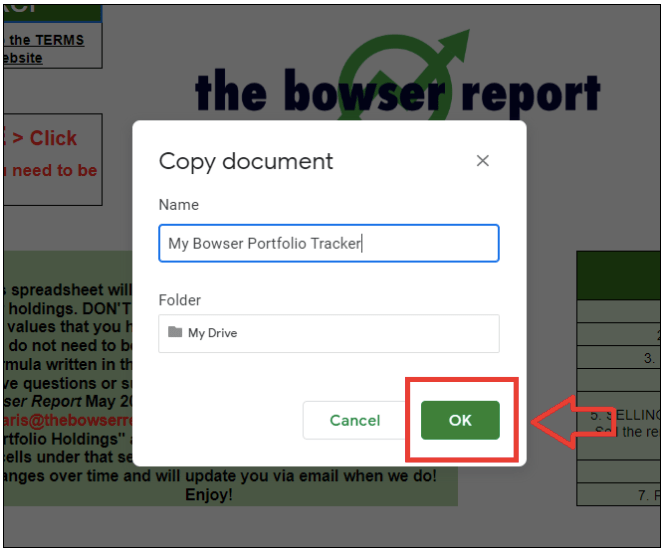
After clicking “OK” to save your copy, your ready-to-edit penny stock portfolio tracker will be saved in your Google Drive. To access on an ongoing basis, visit Google Drive.
Customizing the Penny Stock Portfolio Tracker
The Penny Stock Portfolio Tracker should be used for both new investments and current holdings to create a complete picture of your portfolio.
To start customizing your tracker, enter the start date and starting portfolio value (the amount of money you started with). Also, enter the commission cost per trade, if applicable. Remember, major brokerages no longer charge commission on most trades. Examples of these required entries are in blue text, and you’ll need to replace them.
Next, add in your current holdings under the “Portfolio Holdings” section. This requires you to enter the ticker, purchase (entry) price and number of shares for each holding. Two examples are included in blue text that you will need to replace with your own holdings. The examples are pictured below:

Lastly, when you exit a position, add the exit price in the designated column.
The cells without blue text have formulas to calculate profits, cost basis, portfolio allocation, and more. If you edit these then it may result in error messages. If that happens just click "Undo," email customerservice@thebowserreport.com or make a separate copy of the spreadsheet and start over.
Tracking Dividends
Penny stocks from time-to-time pay dividends. For this reason, there is a dividend tracker included. Access it by clicking on Dividends in the bottom left corner:

Manually enter the dividends you receive on a monthly and/or annual basis to automatically add them to your “Current Portfolio Value” in the main spreadsheet. Reinvested dividends can create a lot of value in the long run and should never be overlooked.
Moving Forward
Tracking your investments may seem overwhelming. However, it doesn't need to be. The basic idea is to keep track of what you buy, what you currently hold and what you sell to know how you're doing. The best part is, this tracker is completely free for your use whether or not you subscribe to The Bowser Report.
Please email customerservice@thebowserreport.com with any feedback, potential errors in the spreadsheet or suggestions for features and changes. Our goal is to provide you with the tools and analysis you need to successfully navigate the markets. Enjoy the Penny Stock Portfolio Tracker and happy investing!
This article was adapted from the May 2020 issue of The Bowser Report (Vol. 44, No. 5); and updated from a June 17, 2020 blog post.




Leave A Comment